

Last Tuesday, Eleanor discovered that her evening ritual of lowering her custom Roman shades was suddenly interrupted by a silent, unresponsive remote. The loss of control over her home’s atmosphere felt like a breach of the sanctuary she had worked so hard to curate. It’s frustrating when high-end technology doesn’t respond. If you’re currently troubleshooting motorized shade remote issues, you aren’t alone; even the most sophisticated systems occasionally require a gentle recalibration to maintain their elegance.
This guide helps you regain mastery over your environment without the immediate need for a service call. We believe that every window treatment is more than a fixture; it’s a lens through which you experience a better lifestyle. You’ll learn to identify if your lithium-ion battery has reached the end of its 500-cycle charge or if the Somfy TaHoma app update to version 2.4 requires a sync. We’ll distinguish between simple power depletion and signal interference. By the end, you’ll understand how to restore movement or know when to invite a specialist in Los Angeles for a technical adjustment.
Key Takeaways
- Identify specific LED indicator patterns on your handheld device to immediately distinguish between a simple power depletion and a deeper communication error.
- Discover how to navigate signal interference from common household electronics that can disrupt the seamless radio frequency of your Lutron or Somfy systems.
- Master the “jog” programming sequence for troubleshooting motorized shade remote issues, allowing you to reset travel limits and correct shade direction with confidence.
- Learn the refined technique for power-cycling automation hubs and bridges to restore connectivity without losing your personalized lighting and shade scenes.
- Understand when environmental factors unique to the Los Angeles coast require the expertise of a certified professional to preserve your hardware’s longevity.
Quick Fixes for Non-Responsive Motorized Shade Remotes
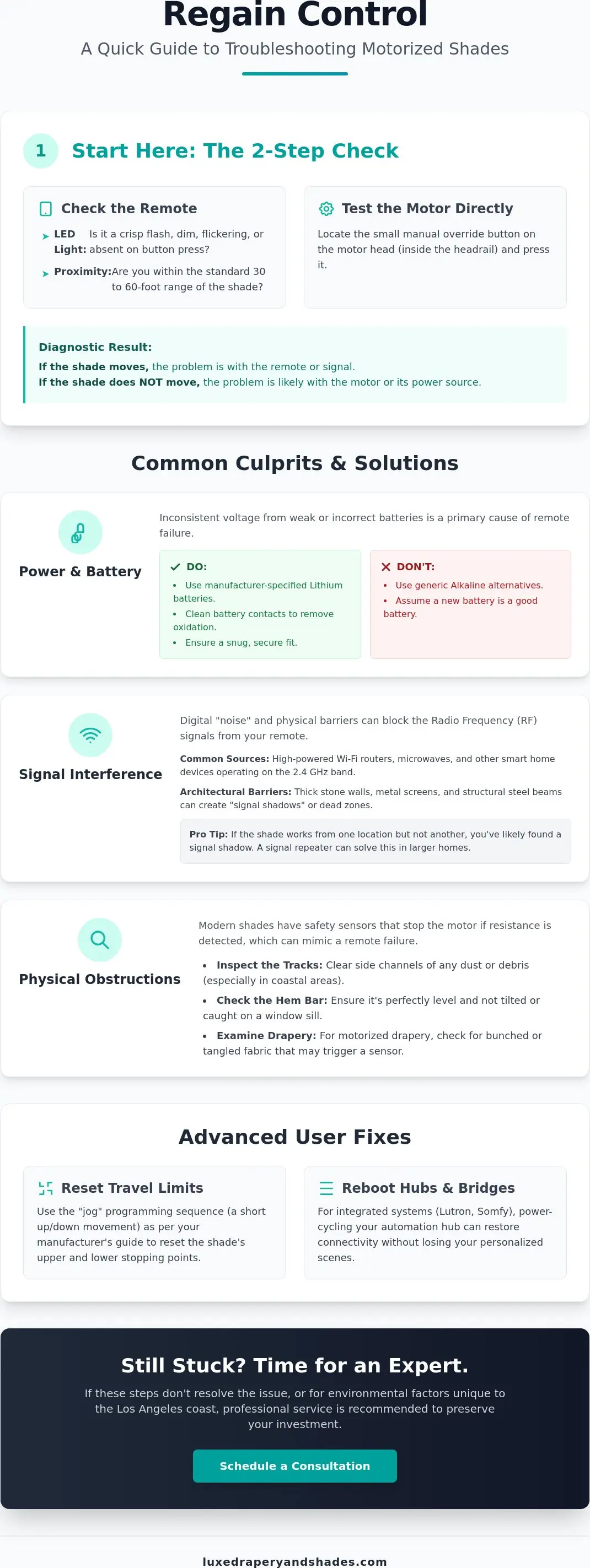
When your shades refuse to respond, the first step in troubleshooting motorized shade remote issues is observing the remote’s LED indicator. A healthy remote should provide a crisp, immediate flash upon every button press. If the light is dim, flickering, or entirely absent, the communication chain is broken at the source. It’s also vital to verify your proximity. While luxury systems offer impressive reach, the dense architecture or high-heat environments common in Los Angeles homes can occasionally attenuate signals. Ensure you’re within the standard 30 to 60 foot range before assuming a deeper hardware failure.
Beyond the signal, the motor itself provides clues. Most high-end motor heads, tucked discreetly within the headrail, feature a small manual override button. Pressing this button bypasses the motorized blind controls of the remote. If the shade moves via the manual button but ignores the remote, you’ve narrowed the issue down to a pairing or signal problem rather than a motorized failure. It’s a simple test that saves hours of unnecessary technical diagnosis.
Battery Health and Replacement Protocols
Luxury systems like Lutron are engineered for precision. This requires a consistent voltage that only high-quality lithium batteries can provide. We often see “phantom drain” in older units, where a remote remains in an active state and depletes power prematurely. Always use the manufacturer-specified brands. Generic alkaline alternatives often lack the peak current needed to wake a sleeping motor. When replacing them, ensure the contact points are clean. A slightly unseated battery or a microscopic layer of oxidation can cause intermittent failures that mimic a broken motor. Troubleshooting motorized shade remote power is often as simple as ensuring a snug, clean fit.
Physical Obstructions and Safety Stops
Modern roller shades and drapery systems are equipped with sensitive safety sensors. These are designed to stop the motor if they detect resistance, preventing damage to the delicate fabric or the motor itself. Sometimes, what looks like a remote failure is actually a safety stop triggered by a slight misalignment or a build-up of coastal salt air and dust in the tracks. Inspect the hem bar for any tilt and clear the side channels of debris. For motorized drapery hardware, a “tangle sensor” may engage if the fabric bunches unevenly. Resetting these sensors often requires a simple manual clearing of the path followed by a fresh command from your remote.
Diagnosing Signal Interference in Modern Smart Homes
In the quiet sophistication of a well-appointed home, the invisible threads of technology are what maintain the atmosphere. Most modern luxury systems, such as those from Lutron or Somfy, rely on Radio Frequency (RF) to communicate. Unlike basic remotes, these signals are designed to travel through walls and floors. However, even the most robust RF systems can encounter digital “noise.” When you are diagnosing signal interference, it’s essential to look at your digital landscape. High-powered Wi-Fi routers and even kitchen appliances like microwaves often operate on the 2.4 GHz frequency band, creating localized congestion that can disrupt the command sent when you are troubleshooting motorized shade remote connectivity.
Architectural materials also play a significant role in signal integrity. In expansive Los Angeles estates, the very elements that provide structural beauty can become barriers. Thick limestone walls, decorative metal screens, and structural steel beams act as shields, reflecting rather than conducting the frequency. If a shade consistently fails from a specific chair but works perfectly from a few feet closer, you’ve likely identified a signal shadow. For these larger properties, signal repeaters are a sophisticated solution. These discreet devices catch the command and rebroadcast it, ensuring the transition from light to privacy remains effortless across every wing of the home.
Radio Frequency (RF) Challenges
RF signals are celebrated for their ability to command shades from another room, yet they aren’t invincible. In open-floor designs, “dead zones” can emerge where the signal simply dissipates before reaching the motor head. This is common in homes with significant glass and metal accents. Re-pairing the remote to the motor after a significant signal drop can sometimes re-establish a stronger “handshake” between the devices. It’s a simple recalibration that often restores the seamless movement you expect from a premium system.
Infrared (IR) Line-of-Sight Issues
While less common in new installations, some specialized or legacy systems utilize Infrared (IR) technology. These require a clear, unobstructed path, much like a traditional television remote. If you are troubleshooting motorized shade remote responsiveness on an IR system, check for physical barriers. A newly installed decorative valance or even a lush indoor plant can inadvertently block the receiver eye. Over time, dust can also cloud this sensor; a gentle wipe with a microfiber cloth often restores clarity. If your layout is particularly complex, you might consider how professional design integration can hide these technical requirements without sacrificing your home’s aesthetic flow.
Resetting Limits and Correcting Shade Direction
Precision is the hallmark of a well-designed interior. When a motorized shade stops an inch too high or travels in the opposite direction of your command, it disrupts the visual order of the room. In these moments, troubleshooting motorized shade remote settings requires an understanding of the “jog.” This subtle, tactile up-and-down movement is how premium motors from brands like Somfy and Lutron communicate. It’s a sophisticated feedback loop that confirms the motor has accepted your programming command. Without this physical confirmation, you’re simply guessing; with it, you’re in total control.
If your shade moves up when you press down, the motor’s internal orientation has likely been inverted. Correcting this doesn’t require a technician. Typically, you’ll hold the “up” and “down” buttons simultaneously until the shade performs a brief jog. Once it signals, holding the center or “stop” button until a second jog occurs will reverse the motor’s polarity. This restores the intuitive relationship between your remote and your window treatments. Beyond simple direction, you can also define a “favorite” position. By adjusting the shade to your ideal height and holding the center button until the motor responds, you create a personalized “Home” or “My” position that balances light and privacy with a single touch.
Correcting Upper and Lower Limits
Over time, high-quality fabrics may settle or stretch slightly, causing the shade to “drift” from its original factory stop points. This isn’t a mechanical failure but a natural adjustment to the environment. To recalibrate, move the shade to its current limit and hold the programming buttons until the motor jogs. You can then nudge the shade to the exact millimeter desired. Saving these refined limits is crucial; it prevents the fabric from over-rotating around the roller tube, which can lead to unsightly fraying or unnecessary motor strain. It’s a small adjustment that preserves both the aesthetic and the longevity of your investment.
Synchronizing Multiple Shades
The “luxe look” is often defined by perfectly aligned hem bars moving in effortless unison across a wall of windows. Achieving this harmony involves troubleshooting motorized shade remote channel assignments. If one shade in a group fails to respond or moves at a different cadence, it’s usually a pairing issue within that specific channel’s memory. By isolating the unresponsive motor and re-pairing it to the group channel, you ensure that every shade reaches its destination at the exact same moment. This creates the seamless, architectural flow that characterizes a truly curated home environment.
Troubleshooting Integrated Systems: Lutron & Somfy Hubs
In a truly modern residence, individual shades are rarely isolated. They exist as part of a broader digital architecture. When troubleshooting motorized shade remote failures in these environments, you must look beyond the handheld device to the central hub. Whether you are using a Lutron Smart Bridge or a Somfy TaHoma hub, this central “brain” orchestrates the movement of every window treatment. If your remote feels sluggish or unresponsive, the interruption often lies within the bridge’s connection to your local network rather than the motor itself.
A common professional technique for restoring order is a controlled power-cycle. Unlike a factory reset, which would erase your carefully curated scenes and schedules, power-cycling simply refreshes the hub’s memory. Unplug the power source from your bridge for exactly thirty seconds before reconnecting. This allows the hardware to clear its temporary cache and re-establish a clean handshake with your Lutron home automation system. It’s a foundational step that resolves the majority of connectivity “ghosts” that haunt high-end installations.
App vs. Remote: Isolating the Problem
To determine if the fault lies with the remote hardware, attempt to trigger the shade via your smartphone app. If the shade responds to the digital command but ignores the physical remote, you’ve isolated the issue to a localized pairing or hardware failure. However, be mindful of cloud-to-hub latency. Occasionally, a command may take a moment to process as it travels through secure servers. If the app displays a “Bridge Not Found” error, the issue is likely your local Wi-Fi router or an IP address conflict rather than the shade hardware itself. Ensuring your hub is positioned away from metal enclosures will significantly improve this reliability.
Firmware and Software Updates
Digital luxury requires periodic maintenance in the form of software patches. Manufacturers like Lutron and Somfy release updates to improve security and refine the communication protocols between devices. For instance, the Somfy TaHoma app version 2.4, released in March 2026, introduced critical stability improvements for integrated systems. You can check the current status of your Lutron Sivoia or RadioRA 3 system directly through the settings menu of the respective app. Outdated firmware can cause 2026-era remotes to lag because the hub struggles to interpret the newer, high-speed signals sent by modern handheld controllers. If your system requires a more technical configuration, we invite you to consult with our automation specialists to ensure your home remains a seamless sanctuary.
Professional Maintenance for Luxury Shades in Los Angeles
Living along the Pacific coast brings a unique set of challenges to home automation. While the previous sections focused on digital recalibration and power cycles, there are moments when the physical environment of Southern California dictates the need for expert intervention. The saline air in coastal neighborhoods can infiltrate motor housings, leading to microscopic corrosion on circuit boards. If your efforts in troubleshooting motorized shade remote connectivity have been exhaustive yet unsuccessful, the issue likely resides in the hardware’s physical integrity. These specialized components require a delicate touch and precise industry knowledge to restore.
Professional maintenance is about more than just fixing a broken motor; it’s about preserving the sophisticated atmosphere of your home. We recommend an annual diagnostic check for high-use systems to ensure that every component, from the drive belt to the wireless receiver, operates with the quiet confidence expected of a luxury installation. Attempting to dismantle these units yourself often risks voiding the manufacturer’s warranty, which is designed to protect your long-term investment. A certified technician understands the nuances of these high-end systems and can resolve deep-seated electronic issues without compromising the hardware’s longevity.
Environmental Factors in Southern California
The microclimates of the South Bay and Westside LA significantly impact battery performance. Excessive afternoon heat can accelerate the degradation of lithium-ion cells, reducing their effective lifespan and leading to more frequent charging cycles. For outdoor zip screens and motorized shades, the combination of humidity and coastal dust can create a residue that adds friction to the movement. This forces the motor to work harder and can eventually lead to a total failure. Regular cleaning of the tracks and sensors is essential. Even for interior pieces like motorized plantation shutters, ensuring the louvers move freely without obstruction is key to maintaining the motor’s health. We suggest a gentle dusting protocol to keep sensors clear of the fine particulate matter common in urban Los Angeles.
The Luxe Drapery and Shades Service Standard
Our team provides a boutique service experience that prioritizes the longevity of your home’s design. We specialize in diagnostic service calls throughout Westside LA and Torrance, offering a level of aesthetic expertise that mass-market providers simply cannot match. Whether you need to recalibrate a modern Lutron system or are looking to upgrade a legacy Somfy installation to current standards, our approach is always tailored to your specific needs. We believe your home should be a seamless sanctuary, where functional items serve as a lens for experiencing a better lifestyle. If you’ve reached the limit of DIY solutions, we invite you to schedule a professional diagnostic visit for your motorized shades.
Reclaiming Your Home’s Seamless Flow
Regaining control over your environment shouldn’t be a source of stress. By understanding the nuances of your system, from the tactile feedback of a motor “jog” to the digital health of your Lutron or Somfy hub, you can maintain the effortless elegance of your living space. We’ve explored how simple battery protocols and signal diagnostics often resolve the most common interruptions. However, when the coastal air of the South Bay or complex electronic failures persist, troubleshooting motorized shade remote issues requires a more specialized touch.
As a Certified Lutron Dealer and Licensed CA Contractor #1066068, we understand that your window treatments are essential elements of a beautiful home. We specialize in the unique technical demands of Westside LA and South Bay estates, ensuring your hardware performs with quiet confidence. If your shades require a more sophisticated recalibration, restore your home’s automation with expert service from Luxe Drapery and Shades. Your sanctuary deserves nothing less than perfect, synchronized movement and absolute reliability.
Frequently Asked Questions
Why is my motorized shade remote blinking but the shade isn’t moving?
A blinking LED on your remote usually indicates that the battery level is too low to transmit a reliable command. While there’s enough power to light the indicator, the device lacks the peak current required to reach the motor. If the light blinks red or orange, it’s time to replace the cells with high-quality lithium batteries. This ensures your troubleshooting motorized shade remote efforts start with a stable power source before you explore more complex signal issues.
How do I pair a new remote to my existing Lutron or Somfy shades?
Pairing begins by putting the individual motor into programming mode, usually by holding the manual button on the motor head until the shade moves slightly. Once the motor is “listening,” you press the programming button on the back of your new handheld device to finalize the link. This secure handshake ensures that your commands are exclusive to your home’s architecture. It’s a precise sequence that maintains the integrity of your digital sanctuary without interfering with neighboring systems.
Can I operate my motorized shades if the remote is lost or broken?
You can still maintain control over your environment using a secondary interface like a smartphone app or a wall-mounted keypad. Most luxury systems are integrated into a central hub, allowing for seamless operation even when the physical remote is absent. If you find yourself troubleshooting motorized shade remote failure in a large Los Angeles estate, these digital backups are essential. They ensure your privacy and light control remain uninterrupted while you wait for a replacement controller to be programmed.
How long do batteries typically last in a motorized shade remote?
Batteries in a high-end remote typically last between three and five years under standard operating conditions. Because these devices only consume power during the brief moment a button is pressed, they are remarkably efficient. However, environmental factors like the intense Southern California heat can occasionally shorten this lifespan. If you notice a decrease in range or a lag in responsiveness, it’s a sign that the voltage is beginning to dip below the required threshold.
Why does my shade stop halfway even though I didn’t press anything?
This unintended stopping is often caused by an active “favorite” or intermediate position stored in the motor’s memory. On Somfy systems, this is the “My” position, designed to help you quickly achieve a specific level of filtered light. If the shade stops at a point that no longer suits your lifestyle, you’ll need to clear the intermediate limit. Resetting these stop points allows you to redefine how the shade interacts with your room’s unique afternoon glow.
Is it possible to control my motorized shades with my TV remote?
Direct control is rarely possible because most TV remotes use Infrared (IR) signals, while luxury shades utilize Radio Frequency (RF). These two technologies speak different digital languages. To achieve a unified experience, you can integrate your shades into a comprehensive home automation system. This allows a single smart interface to bridge the gap between your media and your window treatments, creating a cohesive and effortless lifestyle experience throughout your home.
What should I do if my motorized shade remote got wet?
Remove the batteries immediately and avoid pressing any buttons, as this can cause a short circuit within the delicate internal boards. Allow the remote to dry in a low-humidity area for at least 24 hours before attempting to use it again. Do not use high heat from a hairdryer, which can warp the premium plastic casing. If the device remains unresponsive after drying, the minerals in the water have likely damaged the circuitry, and a professional replacement is the best path forward.
Why do my shades move at different speeds even though they are the same model?
Slight variations in speed are usually due to the physical weight of the fabric or differences in battery voltage between units. A larger Roman shade requires more torque and moves slower than a lightweight roller shade, even if they share the same motor type. In some advanced Lutron systems, we can digitally synchronize the motors to ensure every hem bar moves in perfect alignment. This creates the symmetrical, architectural look that defines a professionally curated window treatment installation.