

What if your shades responded to the rhythm of each room, rather than following one schedule throughout the home? That’s the idea behind smart home scene programming for shades: shaping settings around how you use a space, whether you’re welcoming soft morning light or creating more privacy in the evening. It’s natural to wonder what a scene controls and how to keep automation easy to use. Thoughtful planning starts with your routines, not a complicated menu of settings.
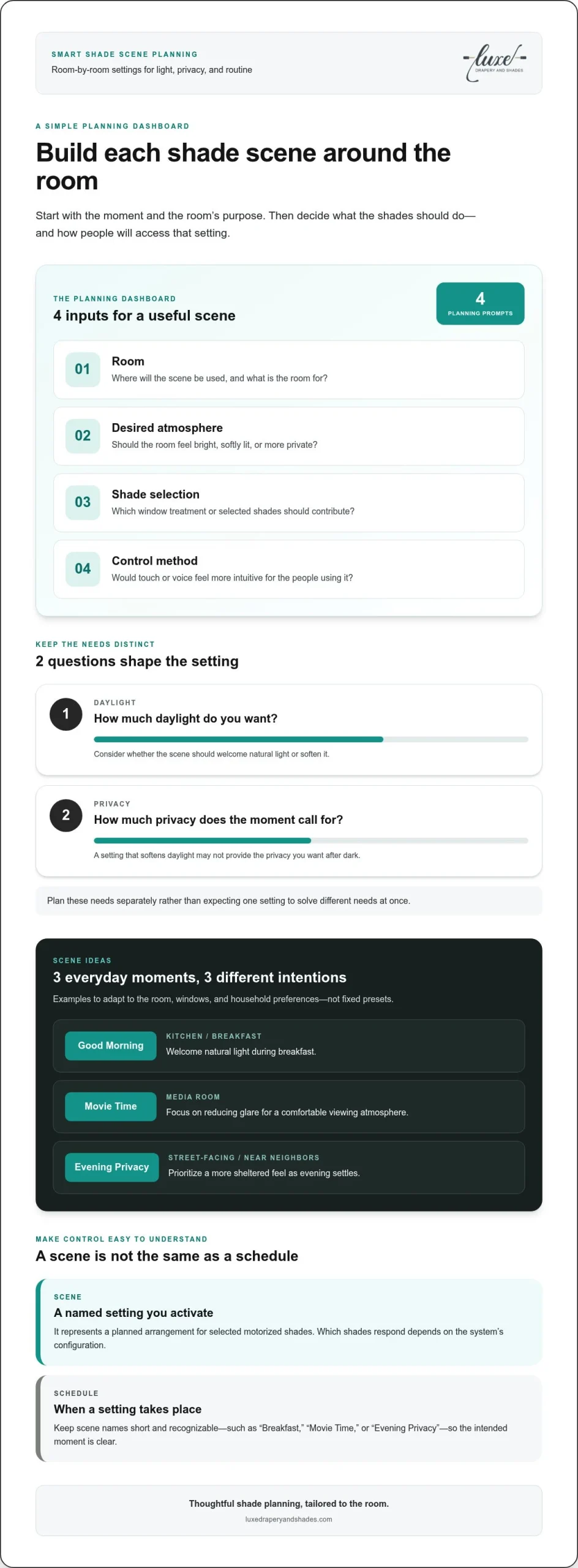
A scene is a named setting you activate, while a schedule determines when a setting takes place. Motorized shades can be controlled by touch or voice, and smart devices can support remote operation. Scenes can make preferred shade settings easier to access, while coordinated shading and lighting can contribute to a room’s overall atmosphere. This guide covers the building blocks of a shade scene, room-by-room ideas, and how to plan around daylight, privacy, and design preferences. The goal is technology that supports the way you live while keeping window treatments part of the room’s character.
Key Takeaways
- A shade scene is a named setting for selected motorized shades, activated through a control.
- Start with each room’s purpose, then consider daylight preferences and privacy needs as separate parts of the plan.
- Use adaptable morning, media, privacy, and evening scene ideas as inspiration, not as fixed presets for every home.
- Keep smart home scene programming for shades intuitive by choosing distinct settings that suit everyday routines.
- A tailored plan can bring shade selection, accurate measurements, and coordinated lighting control together in a considered installation process.
What Is Smart Home Scene Programming for Shades?
A shade scene is a named setting for selected motorized shades, activated through a control. Rather than adjusting each included shade separately, you can use a scene to call up a planned arrangement with a shared purpose, such as managing daylight or creating more privacy. Which shades respond depends on the system’s configuration.
That distinction makes smart home scene programming for shades less about adding complexity and more about making a useful setting easy to access. A considered scene can support the way a room feels at a particular moment, such as softer daylight for a relaxed afternoon or a more private atmosphere as evening settles. The aim is a composed result, not automation for its own sake.
How a shade scene differs from a single shade command
A single shade command addresses one treatment. A scene represents a planned setting for the shades included in that scene. In a living room, for example, you might want selected windows to feel more private during a gathering while keeping the room comfortable. The scene’s behavior depends on its configuration, so don’t assume every shade will respond in the same way.
A scene isn’t necessarily a universal preset or a rule that all window coverings must move together. It’s a deliberate choice about which shades belong in a setting and what the room needs. A clear name makes that intention easy to recognize, while individual shade control remains useful when a particular window needs a separate adjustment.
Where scenes fit within smart home control
Scenes are one way to think about home automation, where connected technologies can be controlled as part of a home system. A What is Home Automation? overview offers useful background. For window treatments, motorized shades can also be planned alongside lighting control, bringing daylight and artificial light into the room’s overall design. The exact controls and actions depend on the installed system.
Motorized shades and blinds can be operated by touch or voice, and smart devices can support remote operation. Luxe Drapery and Shades specializes in motorized window treatments and Lutron shades and lighting control integration. Planning begins with the desired room outcome, then connects shade choices and control preferences to that goal. For a broader look at coordinated systems, explore the Lutron home automation guide.
Think of a scene as a considered instruction: which shades matter, what feeling or function the room calls for, and how you want to access the setting. That clarity keeps technology in service of the interior. The shades remain an integral design element, while their operation can support a preferred balance of light and privacy throughout the day.
Build a Shade Scene Around the Room’s Light, Privacy, and Purpose
A useful scene starts with the room, not a preset name. Before choosing a shade position, consider what the space is for and when people use it. A breakfast nook may benefit from a gentle wash of morning daylight, while a bedroom may call for more privacy at the start or end of the day. These are planning intentions, not fixed settings. The right result depends on the windows, the room, and household preferences.
Separate two questions that are easy to blur together: how much daylight do you want, and how much privacy does the moment call for? A shade position that softens incoming light may not provide the level of privacy you want after dark. Thinking through each need helps define a scene with a clear purpose, rather than asking one setting to solve different needs at once.
Match scene intentions to living spaces
Picture the room at the moment you’ll use the scene. In a kitchen, a “Good Morning” setting might welcome natural light during breakfast. In a media room, a “Movie Time” setting could focus on reducing glare for a comfortable viewing atmosphere. For street-facing windows or rooms near neighbors, “Evening Privacy” may prioritize a more sheltered feel. Adapt each idea to the room’s windows and your household’s preferences.
Connect each scene to a recognizable moment in your routine instead of creating several options that feel interchangeable. For broader context on how routines and scenes fit into home automation, consult Industry Insights on Smart Home Scene Programming. Keep the focus on the outcome you want from the shades in each specific space.
Choose clear names and intuitive controls
Short names such as “Breakfast,” “Movie Time,” or “Evening Privacy” are easier to remember than technical labels. Choose wording that describes an activity or the atmosphere you want, then consider who will use the scene. Touch control may suit someone who prefers direct interaction; voice control may feel more natural for another household member. Motorized shades and blinds can be operated by touch or voice, so choose the approach that fits your routine.
Use this compact checklist to turn an idea into a practical plan:
- Room: Where will the scene be used?
- Desired atmosphere: Should the room feel bright, softened, or more private?
- Shade: Which window treatment or selected shades should contribute?
- Control method: Would touch or voice feel more intuitive for the people using it?
This kind of planning keeps smart home scene programming for shades personal and purposeful. If you’re considering motorized shades for a room or the whole home, explore tailored shading options to bring your preferred atmosphere and practical needs together.
Shade Scene Ideas for Morning, Media, Privacy, and Evening
Scene names are starting points, not universal presets. A morning setting that feels right in one home may be too bright or too exposed in another. For practical smart home scene programming for shades, connect each idea to a room, its windows, and the atmosphere you want to create. The shade system and its configuration determine which treatments respond and how they behave.
| Scene intention | Suitable room | Desired shade effect | Planning note |
|---|---|---|---|
| Morning light | Kitchen or breakfast area | Welcome natural light at a level that suits the household | Consider which windows receive morning sun and whether the room is used for dining, preparing food, or both. |
| Media viewing | Living room or media room | Reduce distracting daylight for a more comfortable viewing atmosphere | Think about glare on the screen and seating areas. The intention doesn’t guarantee complete darkness. |
| Privacy | Street-facing bedroom or living space | Bring selected shades to a position that supports a greater sense of privacy | Consider sightlines from streets, neighboring homes, and shared outdoor spaces. |
| Settled evening | Dining room or family room | Create a softer, more sheltered feel as the day winds down | Decide whether the scene should prioritize coverage, a calm atmosphere, or a balance of both. |
Scenes that welcome daylight or support media viewing
A morning concept can introduce daylight in a way that suits household preferences: perhaps more light in a breakfast space, or a gentler feel where people ease into the day. Treat it as a design choice, not a health promise. A media scene has a different purpose. It may reduce distracting daylight without promising complete blackout. Shade type, fabric, window orientation, and surrounding conditions all influence the atmosphere a scene can create.
Energy-conscious intentions can also inform a scene plan. A household may want a daytime setting that manages incoming sun in a frequently used room. Treat that as a desired shading outcome, not a guarantee of energy savings. The result depends on the window, shade, and overall home conditions.
Scenes for privacy and a settled evening
For windows facing a street, neighbors, or a shared space, an evening privacy scene can bring selected shades to a position that feels more comfortable. Privacy is the intention, not a guaranteed view-blocking specification. Coverage depends on the chosen treatment, its position, and the window’s surroundings.
Keep labels familiar. Names such as “Morning Light,” “Movie Time,” and “Evening Privacy” make the intended moment easy to recognize. As you refine each idea, consider which windows belong in the scene and whether the desired result is primarily about daylight, privacy, or the room’s mood. That distinction helps turn inspiration into a plan suited to your home.
Plan Shade Scene Programming Without Making Control Feel Complicated
A simple planning process can keep shade scenes useful instead of turning them into a long list of controls. Begin with the rooms and moments that genuinely call for an adjustment, then describe the desired result in everyday language. This gives you a clear brief for smart home scene programming for shades without getting caught up in technical menus or assumptions about how a system behaves.
A practical sequence for planning scenes
Work through these steps in order. Each one adds context, from the room’s purpose to the controls that feel natural in daily use.
- List the rooms and moments. Note where shade adjustments would be useful and when they tend to matter, such as during a morning routine, media viewing, or a quieter evening at home.
- Describe the intended result. For each room, record the daylight, privacy, and visual atmosphere you’d like. Keep these aims distinct: a preference for softened light may differ from a need for more coverage.
- Identify the shades involved. Consider which windows contribute to that outcome. A room’s exposures and window arrangement can shape whether one shade or several are relevant to the plan.
- Choose a clear name and control preference. Use a short label tied to a familiar activity or mood. Consider whether touch or voice control feels more intuitive for the people who will use it. Smart devices can also support remote operation of motorized shades.
- Review the lighting-control relationship. Consider whether the desired room atmosphere involves shades alone or relates to broader lighting-control goals. Keep the plan aligned with how you want the space to feel, without assuming every system coordinates in the same way.
For more context on motorized window treatments, the Lutron Sivoia shades guide explores a related shading system. The essential planning question remains practical: what should the selected shades contribute to the room?
Keep the experience cohesive as needs change
A considered set of distinct scene intentions is often easier to understand than several options that amount to the same thing. Give each scene a clear role, and revisit the plan as household routines or room uses shift. A space that once served mainly for reading may become a shared gathering area, changing the preferred balance of light and privacy.
Reviewing the plan is about refining the intention, not assuming the system will adjust itself. Scene behavior depends on the selected shade system and its configuration, so don’t presume automatic schedules, sensors, or adaptive responses. Luxe Drapery and Shades helps Los Angeles homeowners plan motorized shades and Lutron lighting control around the needs of their spaces. To begin planning, plan motorized shades with Luxe Drapery and Shades.
Bring a Tailored Shade Scene Plan to Life in Los Angeles
A thoughtful scene plan takes shape when room use, window treatments, and control preferences are considered together. In Los Angeles, Luxe Drapery and Shades specializes in whole-home shading and lighting control for interior and exterior spaces. That expertise connects the practical goals of smart home scene programming for shades with the character of each room, from its daylight to the privacy its occupants prefer.
Connect shade choices with the home’s design
Shade selection and scene intentions work best as parts of the same conversation. A treatment affects how daylight enters and how the window contributes to the room’s design, while a scene plan considers how that treatment can serve everyday routines. Roller Shades, Roman Shades, Cellular Shades, and custom drapery each bring a distinct look to the window. The right direction depends on the space, its light and privacy needs, and the atmosphere you want to create.
For example, a Roman shade might suit a room where a tailored window treatment is central to the design, while the scene plan focuses on a preferred balance of daylight and coverage. Homeowners considering this option can explore the Lutron Roman shades guide for related context. The goal is to make the treatment and its intended use feel cohesive, rather than treating automation as an afterthought.
Move from consultation to professional installation
The project process brings design and control considerations into a practical plan. During the consultation, Luxe Drapery and Shades can help with product selection, accurate measurements, a comprehensive quote, and a project timeline. This gives you a clear basis for choosing treatments and planning installation.
After product selection and measurement, products are ordered from the manufacturer and materials are shipped directly to your home. Installation is then scheduled. This creates a clear progression from consultation through measurement and ordering to professional installation. Shade choices can also be considered alongside lighting-control goals, including Lutron shades and lighting control, so the design and controls support the atmosphere you want.
For Los Angeles homeowners ready to explore a considered approach to shading and automation, explore Luxe’s shading and automation services.
Shape a More Considered Rhythm at Home
Choose one room and imagine how you’d like it to feel at different points in the day. That reflection gives smart home scene programming for shades a personal starting point, grounded in the way you live rather than technology for its own sake. From there, each decision can contribute to a home that feels distinctly yours, with comfort and design working in harmony.
Thoughtful automation doesn’t need to call attention to itself. Its value can be found in small, well-considered moments: a space that feels welcoming, a window that offers the privacy you prefer, or a room whose atmosphere supports the evening ahead. Let your priorities guide the plan, then explore how tailored shading can complement your home. Explore tailored shading and automation for your home with Luxe Drapery and Shades in Los Angeles.
Frequently Asked Questions
What is a smart home scene for motorized shades?
A smart home scene is a named setting that operates selected motorized shades through a control. It can make a preferred shade arrangement easier to access than adjusting each included treatment separately. For example, a household might create a setting for a home office before focused work. The shades included and their behavior depend on the installed system and its configuration.
Can motorized shades be included in a Lutron lighting scene?
Luxe Drapery and Shades integrates Lutron shades and lighting control systems. This lets shade and lighting goals be considered together when planning a room’s atmosphere. The devices and actions involved depend on the installed configuration, so plan around the result you want in the space.
What shade scenes are useful for everyday living?
Useful scenes reflect recurring moments, not just broad labels. A “Workday” setting could suit a home office where occupants want a consistent feel at the window, while a “Welcome Home” intention might be planned for a frequently used entry or living space. Reading, dining, and hosting can also inspire distinct shade settings. Choose scenes that address different needs, rather than creating several names for nearly identical outcomes.
Can I control motorized shades with voice commands?
Yes. Motorized shades and blinds can be controlled with voice commands, by touch, and remotely through smart devices. Choose the control approach that feels most natural for your household’s daily habits.
Do smart shade scenes automatically follow the sun?
Don’t assume a shade scene tracks the sun or changes automatically as daylight shifts. That behavior depends on the system and its configuration. Plan scenes around settings you intend to activate unless your system is specifically configured for an automatic response. For a west-facing room, for instance, you might plan a shade setting for the time of day when incoming light feels strongest.
How do I plan shade scenes for different rooms?
Start by noting how each room is used, which windows shape its light, and whether privacy matters at particular times. Then identify a distinct shade intention and a clear name for that space. Los Angeles homeowners can consider each window’s orientation and nearby sightlines as part of the plan. Keep a separate note for rooms with different needs, even if they share similar window treatments.
Are shade scenes difficult to use?
They can feel straightforward when each scene has a clear purpose and an easy-to-remember name. Keep the choices distinct, such as one for focused work and another for relaxing, and select a control method that suits the people using the room. Motorized shades offer touch and voice control, as well as remote operation through smart devices. The experience depends on the installed system and how its scenes are configured.