

A boardroom’s windows should support the meeting, not compete with it. Automated shades for corporate boardrooms use motorized window coverings to manage daylight, reduce direct-sun glare, and provide privacy when needed. A well-planned system also makes controls straightforward for the people using the room.
That matters in Los Angeles, where bright natural light can add warmth but make screens harder to see. Choosing automated shades for corporate boardrooms involves more than picking a dark fabric: consider window exposure, opacity, privacy needs, and how the room is used.
This guide covers how motorized shades work, which styles suit different boardroom needs, and what to consider when planning installation and controls. The right choice can support presentations and everyday meetings while complementing the room’s design.
Key Takeaways
- Match shade fabric and opacity to the boardroom’s daylight, privacy, and presentation needs.
- Choose controls that suit how the room is used, from wall switches to app-based or voice operation.
- Plan installation around the windows, existing shades, and any conference-room AV controls; a standard installation typically takes half a day to a full day.
- Coordinate shading with lighting, schedules, and sensors to shape a more comfortable and presentation-ready room.
What are Motorized Blinds and Shades?
Motorized shades replace hand-operated coverings with powered movement and convenient controls. In a boardroom, a user can lower the shades before a presentation without adjusting each window by hand.
Remote and Wall-Switch Controls
Choose controls to suit the room’s routine. Wall controls provide a fixed option, while motorized shades and blinds can also respond to touch or voice commands and connect with smart devices for remote operation. Consider whether staff need simple adjustments during a meeting or coordinated control for presentations.
Individual, Zone, and Building Control
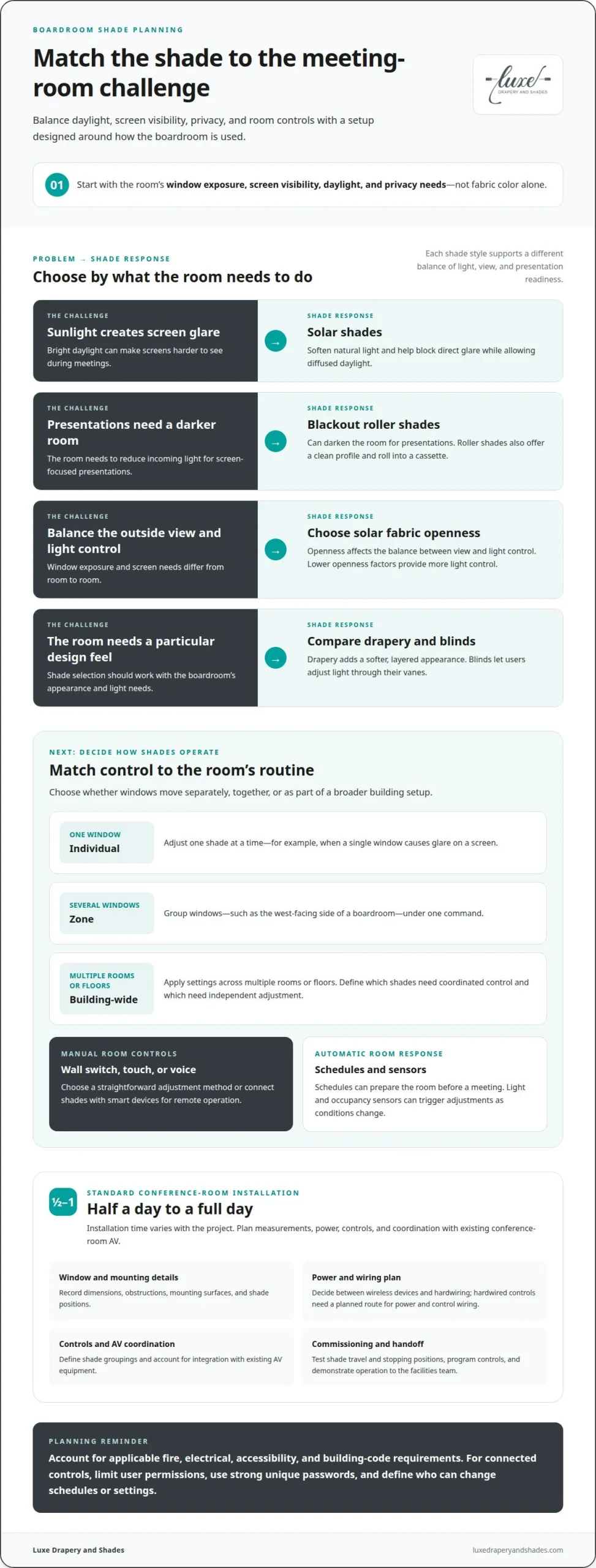
Individual control moves one shade at a time, useful when a single window creates glare on a screen. Zone control combines several windows, such as the west-facing side of a boardroom, under one command. Whole-building control applies settings across multiple rooms or floors. During installation planning, define which windows should move together and which need independent adjustment for different meeting uses.
Motorized window treatments can integrate with smart devices for remote management. For a boardroom, first identify how staff will use the controls and whether shades should operate independently or as part of a coordinated room setup. Luxe Drapery and Shades specializes in motorized treatments and Lutron lighting control systems.
Schedules can raise or lower shades at selected times, while light and occupancy sensors can trigger adjustments as room conditions change. For example, a schedule can prepare a boardroom before a meeting, and coordinated lighting can shift to a presentation scene as the shades close.
U.S. offices must address applicable fire, electrical, accessibility, and building-code requirements for the site and installation. Design should consider power routing, control placement, and window or egress conditions under the requirements that govern the building.
Connected controls can lose remote access during network interruptions, while weak account security can expose settings. Limit user permissions, use strong unique passwords, and define who can change shade schedules or system settings.
Commercial shade installation and project services
A commercial project moves from window measurements to installation, controls, and final testing. In a standard conference room, motorized shade installation typically takes half a day to a full day.
Installation and Hardwiring
Installation starts with measuring each window and recording obstructions, mounting surfaces, and shade positions. The power plan then determines whether the system uses wireless devices or hardwiring. Hardwired controls need a planned route for power and control wiring, while wireless options reduce wiring needs at the window. For an existing conference room AV system, adding shade motor controllers, motorizing or replacing shades, and programming shade control can connect operation with the room’s setup.
Installation Costs
Measurement and installation costs depend on the project’s scope, not a single standard figure. Key factors include window dimensions, the number of shades, mounting conditions, wiring needs, and the control system selected. Integration with existing AV equipment can also affect the work involved. A tailored quote follows a quote request, with the project details shaping its scope. Clear measurements and a defined control plan help establish the requirements before installation begins.
Commissioning and Maintenance
After installation, commissioning puts the system into working order. The installer tests each shade, checks its travel and stopping positions, then programs the intended controls and groupings. A final walkthrough can demonstrate operation to the facilities team, including how to use wall controls or room-system commands. For ongoing maintenance, keep shade paths clear and periodically inspect visible mounts and controls. If movement becomes uneven, address the cause before continued operation strains the mechanism.
Project support also means coordinating the installation sequence with room use and other trades. For example, aligning shade wiring and control programming with AV work can reduce disruption and support efficient handoff. To explore commercial shade planning, consider how window measurements, power, and room controls will shape the installation.
Motorized shade automation for commercial buildings
Motorized window treatments can make it easier to adjust light and privacy as boardroom needs change. The right product depends on the room’s windows, design, and desired level of light control.
Commercial Shade Styles
Roller shades offer a clean profile, rolling into a cassette to reveal the window or stopping partway to admit daylight. Blackout roller shades can darken a room for presentations. Solar shades soften natural light while helping block direct glare; lower openness factors provide more light control. Drapery brings a softer, layered appearance, while blinds let users adjust light through their vanes. For automated shades for corporate boardrooms, consider screen visibility, daylight, privacy, and the room’s design.
Commercial-Grade Boardroom Systems
Luxe Drapery and Shades provides motorized shades and Lutron lighting control systems. When choosing a setup, consider how staff will operate the shades and whether they need individual window control or a coordinated room setting. Motorized shades and blinds can also connect with smart devices for remote management.
Automated shades for corporate boardrooms can be planned around the needs of individual rooms or shared spaces. For example, a coordinated setting can help prepare a meeting room for a presentation. Decide which windows should move together and which should remain independently adjustable.
Fabric choice balances daylight and outside views. Solar fabrics can reduce direct glare while allowing diffused natural light; openness affects the balance between view and light control. Select fabric and opacity based on the room’s screens, window exposure, and privacy needs.
To support energy efficiency goals, consider how shade adjustments respond to sunlight and room use. Light and occupancy sensors can help manage heat gain and daylight. Coordinated lighting can shift to a presentation scene as shades close, creating a more deliberate transition to screen viewing.
Integration with HVAC, lighting, schedules, and sensors
In a Los Angeles boardroom, integration links window shades with room conditions and meeting needs. The goal is coordinated operation, not simply adding another control.
Light sensors can prompt shade adjustments as daylight shifts across windows, helping manage glare and heat gain. Occupancy sensors can support responses based on whether a room is in use. For example, a sensor-led setting can preserve natural light during an occupied meeting, then lower shades when direct sun reaches a presentation screen.
Shading and HVAC work together through their effect on solar heat entering the room. A practical sequence is to set shade responses for sun exposure, then coordinate room temperature control around those changes. This supports a consistent comfort strategy without assuming that every shade system directly controls HVAC equipment.
A consistent control plan makes operation easier to understand. For example, staff can use a designated setting for presentations and adjust shades separately for other meetings. Plan lighting and shade operation together when both are part of the room’s design.
For building management system integration, motorized window treatments can connect with building automation systems. Google Home and Alexa are also integration options for motorized treatments. The right setup depends on which system operators use and how commands should work across rooms. Confirming the intended functions during system design helps keep shade, lighting, and building controls aligned.
For any boardroom, identify who will operate the shades and what settings will be useful, such as meeting or presentation positions. Luxe Drapery and Shades specializes in Lutron lighting control systems and motorized window treatments, helping bring shading and lighting choices together.
For a boardroom control plan that brings lighting and shading together, explore integrated lighting control as part of the design.
Luxe Drapery and Shades: Roller Shades
Luxe Drapery and Shades offers roller shades for boardrooms where a streamlined look and considered light control matter. Motorized shades make it convenient to adjust window coverings for meetings, presentations, and changing daylight.
For a tailored interior, consider custom drapery, Roman shades, or cellular shades alongside roller shades. The right option depends on the windows, privacy needs, daylight preferences, and design direction. Luxe Drapery and Shades helps bring product selection, measurements, and installation together.
If you’re planning boardroom window treatments in Los Angeles, contact Luxe Drapery and Shades to discuss your project.
Shape the boardroom around its purpose
A well-considered window treatment plan can support more than meeting logistics. It can help the boardroom express the organization’s character, complement its architecture, and feel composed for the people who use it. As you refine plans for automated shades for corporate boardrooms, consider the atmosphere you want the room to convey, from focused and understated to warm and welcoming.
That design direction gives the consultation a useful starting point. Think about how the window treatments should relate to the room’s finishes, furnishings, and overall style. Luxe Drapery and Shades can help shape a tailored plan that considers both appearance and practical needs.
For a considered next step, contact Luxe Drapery and Shades to discuss your boardroom project. A thoughtful plan can make the room feel distinctly yours.
Frequently Asked Questions
What types of automated shades are suitable for corporate boardrooms?
Roller, solar, blackout, light-filtering, and cellular shades can suit boardrooms, depending on the room’s purpose. For a presentation room, blackout fabric helps darken the space; for screen visibility with daylight, solar fabric can reduce direct glare. Cellular shades offer another option when filtering light and insulation are priorities. In a Los Angeles office, window exposure and the desired outside view help guide fabric and opacity choices.
How much do commercial motorized window shades cost per window?
The price depends on the project and is provided after a quote request. Per-window cost factors include window dimensions, shade fabric and opacity, motorization, mounting conditions, and the control approach. A boardroom with large glass panels may require different specifications from one with smaller windows. Installation scope and integration with room controls can also affect the project. A quote based on measurements and the intended use gives a more relevant figure than a generic estimate.
How do wired and wireless automated shades compare for corporate offices?
Wired shades use planned power and control wiring, while wireless systems reduce wiring needs at each window. In a new office fit-out, wiring can be coordinated with other building work; in an existing boardroom, wireless control may avoid extensive wiring routes. The choice also depends on window access, the control system, and how shades will be grouped. Consider these factors alongside room use and the desired operation.
How can automated shades integrate with room control systems like Crestron or Savant?
Room-system integration generally involves shade motor controllers and control programming that connects shade commands with the room’s operating interface. In a boardroom, this can let a meeting control sequence coordinate shades with presentation equipment. Crestron and Savant installations depend on the specific system architecture and interfaces used in the space. Define the desired commands, such as lowering shades for a presentation, as part of the integration plan.
What sensors and scheduling options automate boardroom shades?
Light sensors can respond to changing daylight, while occupancy sensors can support adjustments based on room use. Schedules can prepare a boardroom before a planned meeting or set shades for recurring presentation times. For example, a daylight response can adjust coverage as sun reaches a screen, while room lighting shifts into a presentation scene. The useful settings depend on window exposure, meeting patterns, and how the room is operated.
What power, wiring, and network requirements do commercial motorized shades have?
Requirements depend on the selected motors and controls. A wired layout needs planned power and control routes; wireless options reduce wiring at the windows. App-based or remote operation may use network-connected controls, while a standalone wall switch may serve a simpler setup. During project planning, map the power source, control locations, network connection points, and any building-system interfaces needed for the intended functions.