

Automated shades for property managers are motorized window coverings that move to a chosen position without manual operation. Depending on the system, controls may include a remote, smartphone, voice command, schedule, or scene, helping teams manage shades consistently across residential and commercial properties.
Convenience is only part of the decision. The right control approach also needs to suit how a building is used, who operates its shades, and how each space should feel throughout the day. Leaving shades down can limit views into an interior, while scheduled movement can help a property appear occupied when residents are away.
This guide explains the main control options, power choices, and integration considerations, along with what affects installation and project cost. You’ll see how a professional can match motorized shades to a property’s needs, coordinate them with lighting controls, and create a composed result that feels as considered as it is practical.
Key Takeaways
- Match control methods to how each property is used, from simple remote operation to programmed schedules and scenes.
- Compare battery, solar, plug-in, and wired power based on the installation and ongoing operation each space requires; compatible solar options can extend battery life up to 3 years.
- Consider how smartphone and voice controls fit alongside a building’s automation system before settling on an integration approach.
- Explore how shade type, control preferences, and power choices work together to shape a cohesive property-wide plan.
What are Motorized Blinds and Shades?
Motorized window treatments use a motor to move shades or drapery without manual operation. In commercial buildings, automated shades can support consistent light control, occupant comfort, and energy-management goals.
Motor Types and Power Choices
Motor selection depends on the treatment, window, and desired controls. Battery, solar, plug-in, and wired power are options to weigh during planning. Compatible solar panels can extend battery life up to 3 years. For roller shades, the motor moves the shade; motorized drapery hardware moves fabric along a track. Installation planning should coordinate the track or shade, power source, and control method.
Automated and Manual Shade Comparison
Manual shades require someone to operate each treatment, while motorized shades move to a chosen position without pulling a cord. That can simplify recurring adjustments across spaces with multiple treatments. Automated shades for property managers can also follow schedules, but the controls and power source need to be planned. The right fit depends on how often occupants adjust shades and who manages the settings.
Safety, Accessibility, and Building Code Requirements
In the United States, safety, accessibility, and building-code requirements depend on the property and applicable local rules. Plan installation around the building’s requirements and occupants’ needs rather than assuming one standard applies everywhere. Motorized operation removes the need to pull a shade by hand, but the selected controls still need to suit the people using them.
Automated systems can lose connectivity, and privacy depends partly on control settings and access to connected devices. Repairs may involve the motor, power supply, control, or treatment, so system complexity affects maintenance needs. Rebates and tax incentives vary by location and program; automated operation alone doesn’t establish eligibility. For commercial buildings, automated shades can reduce energy consumption and support efforts to meet LEED sustainability standards.
Remote, app, voice, schedule, and scene control
Control options shape how residents and property teams adjust shades throughout a building. A remote, app, voice command, schedule, or scene may suit different rooms and routines.
Remote, App, and Voice Controls
A handheld remote lets occupants adjust a shade without opening an app. App-based controls let users manage individual treatments from a smartphone. Voice commands offer hands-free operation when supported by the system. For instance, a resident might use a remote in a bedroom and an app in a shared lounge. During planning, match each control method to the rooms and people who will use it.
Schedules and Scenes
A schedule moves shades at selected times, while a scene sets preferred positions for selected treatments. Property teams can use an app to create routines for a lobby, conference room, or common lounge. For example, a schedule might raise shades in the morning and lower them later. Some systems allow randomized schedules to make a home appear occupied while residents are away. For property managers looking to reinforce this type of visual deterrence with physical access control, experienced specialists like A Aable Locksmith provide comprehensive residential and commercial security services. Scene names such as “presentation” or “evening” can make repeated adjustments easier.
Light, Glare, Heat, and Privacy Control
Shade position affects natural light, glare, and the view into a room. In a west-facing meeting space, lowering shades during bright afternoon conditions can reduce direct glare on screens. Changing a treatment also changes how much daylight enters, which can affect indoor comfort and heat from sunlight. Privacy needs vary by room: a street-facing ground-floor unit may call for a different position than an upper-level lounge. Scenes can make these preferences easier to repeat.
Individual and Group Control Across Units
For multiple units, a professional can map treatments by building, unit, and room, then organize individual and group controls. This lets a property manager adjust one shade or a defined group, such as common-area windows. Tenant access can be arranged for individual units, while management oversees shared spaces. A clear naming structure, such as “Unit A living room,” helps distinguish treatments and schedules. Defined access also reduces confusion between shared-area settings and residents’ adjustments.
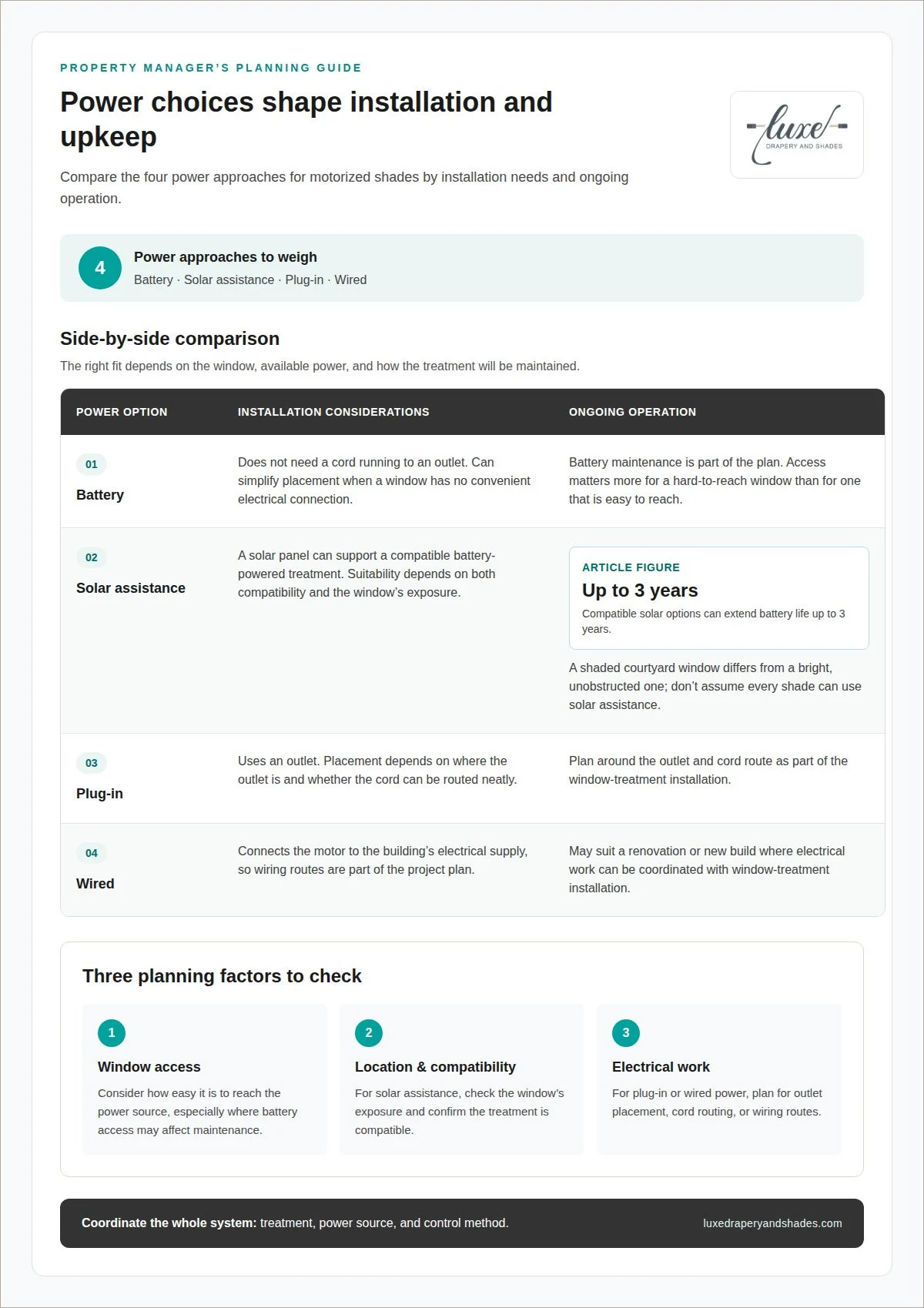
Battery, solar, plug-in, and wired power options
Power choice affects installation planning and day-to-day operation. In a rental property, the right option depends on window access, nearby power, and how the treatment will be used.
Battery Power
Battery-powered blinds do not need a cord running to an outlet, which can simplify placement when a window has no convenient electrical connection. The tradeoff is battery maintenance, so property teams should include the power source in their planning. For example, battery access may be a bigger consideration for a hard-to-reach window than for one that is easy to reach.
Solar Assistance
A solar panel can support a compatible battery-powered treatment by helping extend battery life. Suitability depends on the window’s exposure and the treatment’s compatibility with solar power. A shaded courtyard window, for instance, differs from a bright, unobstructed one. Factor the location into the installation plan rather than assuming every shade can use solar assistance.
Plug-In and Wired Power
Plug-in power uses an outlet, so placement depends on outlet location and cord routing. A nearby outlet may work for a window where the cord can be routed neatly. Wired power connects the motor to the building’s electrical supply, so wiring routes become part of the project plan. It may suit a renovation or new build where electrical work can be coordinated with window treatment installation.
Each option balances installation needs with ongoing operation. Battery power avoids a cord to an outlet, while plug-in and wired systems rely on an electrical connection. Solar assistance can support compatible battery treatments. A professional can assess each window, treatment, and power route before selecting a system.
Power selection and energy efficiency are related, but they are separate decisions. Automated shades can support energy management by controlling sunlight; the motor’s power source determines how the treatment operates. For example, a property team might prioritize daylight management in a sun-exposed common room while choosing power based on window access and electrical layout.
Smartphone, voice, and building automation integration
Integration determines how motorized shades fit with a property’s existing controls. A professional can plan the desired experience, from smartphone access in a unit to coordinated operation across a building.
Smartphone and Voice Integration
A smartphone can provide a convenient way to adjust shades, while voice control offers another option for compatible systems. During planning, identify which rooms need app access and who needs control. For example, a resident may prefer voice commands in a living room, while a property manager uses a phone to adjust a shared space. A physical button can also offer a straightforward control point when included in the system.
Smart-Home and Matter Compatibility
Smart-home compatibility depends on the shade system and the building’s existing devices. Consider Matter compatibility as part of the system review rather than assuming it from the word “smart.” A professional can identify the intended control platform and plan integration around the devices and functions involved. This matters when shades need to work alongside other building controls rather than as a standalone device.
For a property with an existing smart home, integration planning starts with its current controls and the desired shade functions. Define which controls serve residents and which are available for shared areas. This distinction helps separate tenant access from building-level operation. Clearly named rooms or zones also make daily use easier for residents, maintenance teams, and managers.
Voice and app access can add convenience, but controls should suit the people using them. In a household with children, a physical control may be simpler than navigating an app. In a common room, smartphone access may suit staff managing several treatments. The goal is a coherent control plan that respects each space’s routines and privacy needs.
For a tailored integration plan, discuss your shade control needs with a professional.
Luxe Drapery and Shades
Luxe Drapery and Shades helps property managers plan motorized window treatments that work cohesively across a property. The team can help match shade styles and operation to each space, whether the priority is managing daylight in a shared room or creating a tailored feel in a residence.
Options include motorized shades, Roller Shades, Roman Shades, Honeycomb / Cellular Shades, and Custom Drapery. The right choice depends on the room, its desired appearance, and how occupants will use the controls. Discussing these details with a specialist can help align the treatment and motorization with the interior design.
For a tailored conversation about your property, contact Luxe Drapery and Shades.
Shape a More Considered Property Plan
A thoughtful plan for automated shades for property managers starts with the experience each space should offer. Consider how residents and staff use the rooms, which windows need regular adjustment, and how treatments should complement the property’s interiors. These priorities can guide a tailored approach without treating every unit or shared area alike.
Luxe Drapery and Shades can help bring these preferences together through motorized window treatments and design options such as Custom Drapery, Roller Shades, and Roman Shades. Sharing the property’s priorities and existing controls gives the conversation a useful starting point, whether you are planning for one residence or a larger project.
Contact Luxe Drapery and Shades to discuss a refined approach for your property. A well-considered plan can make everyday comfort feel naturally at home.
Frequently Asked Questions
Do schedules automatically adjust for Daylight Saving Time?
Whether schedules adjust automatically depends on the shade system and its time settings. A schedule set to a fixed clock time may behave differently from one managed through a connected app or building platform. For a Los Angeles property, have the installer set the correct time zone and explain how seasonal clock changes affect programmed routines. Review schedules after a time change if room routines appear out of step.
Why Smart Shades?
Smart shades make window treatment control more convenient by bringing motorized operation into a connected home or building. A resident, for example, can use a voice command or connected device instead of adjusting a shade by hand. In a managed property, planned controls can also support consistent routines in shared areas. The benefits depend on choosing functions that fit the occupants, rooms, and management approach.
What are the benefits of automated shades for rental properties and property managers?
Automated shades can simplify recurring tasks for property teams and give residents a considered way to manage daylight and privacy. A manager, for example, could organize common-area shades separately from controls inside individual units. This can make building routines easier to oversee while preserving residents’ control of their own spaces. The benefits depend on matching the control plan to how the property is occupied and managed. Experienced management companies like morganpropertysolutions.com frequently factor these types of smart conveniences into portfolio maintenance and tenant satisfaction strategies.
How much do motorized window shades cost per window, including installation?
Cost per window depends on the treatment, window dimensions, motorization, power choice, and installation scope. A project with different window types or control requirements may need a tailored quote rather than a single standard figure. Luxe Drapery and Shades provides pricing after a quote request. For an accurate estimate, the proposal should reflect the selected treatments and work required at the property.
Which smart shade brands offer bulk pricing or property management programs?
Bulk pricing and property management programs vary by brand, so there is no universal program to name. For integrated projects in Los Angeles, Luxe Drapery and Shades works with Lutron shades and lighting control systems. This identifies a supported integration option, not a claim about bulk pricing. For a multi-unit plan, consider how the controls fit the property’s existing setup and residents’ access needs.
How do automated shades integrate with smart home systems and building management platforms?
Integration connects shade operation with compatible smart devices or a building’s control environment. A professional can plan which rooms, user controls, and shared areas belong in the system, then configure the setup around those needs. Luxe Drapery and Shades offers motorized treatments with touch or voice control and smart-device remote operation. When requesting a project quote for a Los Angeles property, discuss your existing platform and intended functions.