

Voice-controlled blinds for disabled access can make adjusting light and privacy easier without reaching for a window cord. Motorized blinds can be operated by button, remote control, or voice command; with a smart hub, control may also be available through a smartphone or tablet, Amazon Alexa, or Google Assistant. The right setup depends on which control methods and smart-home connections suit the person using the blinds.
Convenience matters, but so does a control system that feels intuitive and fits naturally into the home. This guide explains how automated blinds work, how button, remote, and voice control differ, and what to consider when choosing an accessible setup. You’ll also learn how window treatment style, room use, and smart-home compatibility shape the decision, so you can balance practical operation with a considered interior.
Key Takeaways
- Understand how smart-home integrations connect motorized blinds with voice assistants and other control devices.
- Compare button, remote, and voice operation to identify an accessible control method that suits everyday routines.
- Consider how room layout, reach, and the devices already in your home can shape remote-control choices.
- Explore how custom drapery, roller shades, Roman shades, and cellular shades can bring thoughtful operation into a coordinated interior.
What Are Smart Home Automated Blinds?
Smart home automated blinds use a motor and compatible controls to adjust a window covering without pulling its cord. A smart hub can connect control through a smartphone, tablet, Amazon Alexa, or Google Assistant.
Smart-Home Voice Integration
Voice integration connects motorized blinds to a compatible assistant, so a spoken command can open or close them. For example, a user can say, “Open the living room blinds,” instead of reaching across the room. Before choosing a setup, identify which voice assistant and devices the household uses, then match the blinds and controls to that system.
Hub and Wi-Fi Compatibility
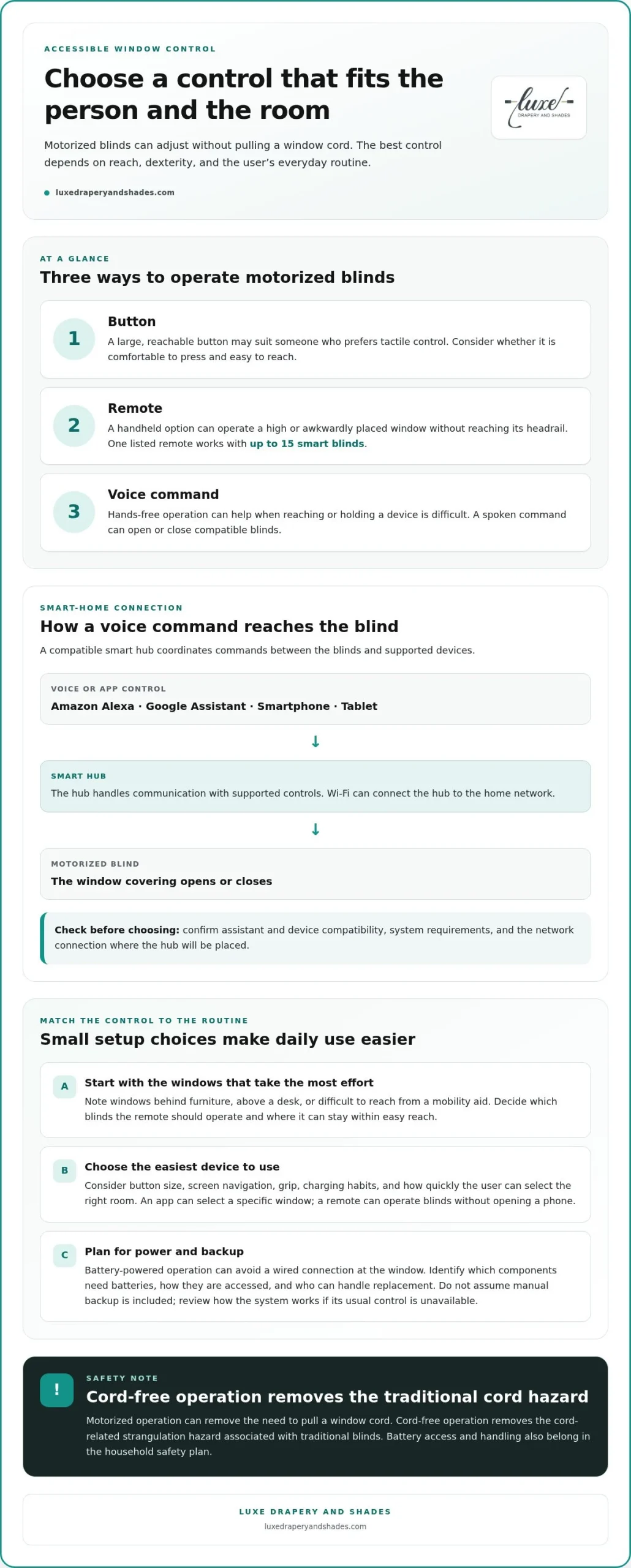
A smart hub coordinates commands between blinds and compatible devices, including Amazon Alexa. Wi-Fi can connect the hub to the home network, while the hub handles communication with supported controls. Check the system’s compatibility requirements and the available network connection at the hub’s intended location. This helps clarify how a voice command travels from an assistant to the motor.
App and Remote Controls
A smartphone app offers an on-screen way to adjust individual blinds, while a remote control provides a separate handheld option. These controls can complement voice commands, giving the user a choice based on the task or room. For example, an app can select a specific window, while a remote can operate blinds without opening a phone. Consider which devices are easiest to reach and use.
Motor Costs and Retrofit Installation
In the United States, cost depends on the motor, blind dimensions, control compatibility, and installation needs; pricing is provided after a quote request. To assess a retrofit, identify the existing blind’s type and operating mechanism, then match a motor and controls to its construction. Installation involves fitting the motor and connecting the selected controls, with the existing window treatment guiding the work.
Potential grants, tax credits, Medicaid waivers, and other assistance depend on program eligibility and whether the requested home adaptation is covered. Treat funding as a separate planning step, and compare the applicable criteria before choosing equipment.
Accessible operation by button, remote, or voice command
Motorized blinds offer different ways to adjust a window without pulling a cord. The most useful control depends on reach, dexterity, and the user’s preferred routine.
Operation for Hard-to-Reach Windows
A remote can operate a high or awkwardly placed window without requiring someone to reach its headrail. One listed remote works with up to 15 smart blinds, allowing several windows to respond through the same handheld control. Consider where the remote will be kept and whether its buttons are comfortable to press. Voice commands can also help operate a window when reaching or holding a device is difficult.
Cordless Controls and Manual Backup
Motorized blinds can remove the need to pull a window cord, while button, remote, or voice controls provide different ways to move them. Cord-free operation removes the cord-related strangulation hazard associated with traditional blinds. Manual backup is a separate design consideration, not something to assume from motorization alone. Review how the system operates if its usual control method is unavailable, and consider whether that alternative suits the household.
Battery-powered operation can avoid a wired connection at the window. Include battery access in the control plan: the location and handling should suit the person responsible for maintaining the system.
Ease of Use and Safety
For limited mobility or dexterity, the easiest system is the one whose controls match the user’s abilities and daily habits. A large, reachable button may suit someone who prefers tactile control; a remote or voice command may work better when reaching is difficult. Google Assistant and other compatible smart-home controls can offer hands-free operation. Compare these methods in the rooms where the blinds will be used.
Which voice-controlled blinds are easiest to use? Choose compatible motorized blinds with a voice assistant the user already knows, while retaining a reachable button or remote where useful. For child safety, cordless operation removes the traditional cord hazard; battery access and handling also belong in the household safety plan.
Explore motorized blinds as one way to bring accessible control into a considered window design.
Remote control for people with physical limitations
A handheld remote can make window adjustments more manageable when reaching, gripping, or pulling a cord is difficult. For example, someone seated across a bedroom can open the blinds without approaching the window. Convenience depends on more than distance: consider button size, control placement, and whether the user can operate it comfortably.
Begin by identifying the windows that require the most effort. Note whether a window is behind furniture, above a desk, or difficult to reach from a mobility aid. Then decide which blinds the remote should operate and where it can stay within easy reach. A consistent place, such as a bedside table, makes the control easier to find during a morning routine.
When evaluating voice controlled blinds for disabled access, consider how a smartphone fits into the user’s routine. Before choosing between a phone and handheld remote, think about screen navigation, grip, charging habits, and how quickly the user can select the correct room. A remote may suit opening bedroom blinds, while an app may work better for managing several rooms.
Battery needs are part of the routine. The remote and motor may rely on separate power sources, so identify which components need batteries and how they’re accessed. Consider who can handle replacement and where the relevant battery compartment sits. This practical step helps keep control convenient without assuming every system uses the same arrangement.
During installation, plan the motor and control placement around the user’s reach and preferred approach to each window. For a setup of voice controlled blinds for disabled access, keep the remote accessible from the chair or bed where it will be used. Walk through how to open and close the blinds before settling on the arrangement.
Reviewing the morning routine, smart-device use, battery access, and window layout can help identify a control arrangement that supports independence and complements the room.
Voice control compatibility
Compatibility depends on the connection between the motorized shade, control system, smart device, and voice assistant. Match these pieces before choosing voice commands, so a request such as “open the bedroom shades” reaches the intended window.
Start with the assistant already used at home, such as Amazon Alexa or Google Assistant. Then identify whether the motor connects directly or through a smart hub, and whether that hub uses the home’s Wi-Fi. Follow the setup sequence: pair the motor, connect the hub if needed, link the assistant, then name each room or shade clearly. Distinct names make commands easier to remember and reduce mix-ups.
Voice-controlled options include motorized roller shades, Roman shades, honeycomb or cellular shades, woven wood shades, and motorized blinds. The fabric or slat style shapes light filtering and privacy; the motor and integration determine how voice control works. A manual control can remain useful as an alternative when hands-free commands aren’t practical.
Popular blind brands are best compared by the complete system, not a single label. Review compatibility with Amazon Alexa or Google Assistant, the required hub and Wi-Fi connection, available app or remote controls, and how each shade responds to commands. Price depends on the shade type, dimensions, motor, integration, and installation needs, with a quote reflecting the chosen configuration. Reliability and accessibility depend on whether the system operates consistently in the home and offers controls the user can comfortably use.
Before selecting a system, write down the assistant, network, rooms, and preferred shade styles. This simple inventory makes integration decisions more precise. Explore custom motorized window treatments to align voice control with the room’s light and privacy needs.
Luxe Drapery and Shades: Custom Drapery
Luxe Drapery and Shades helps bring window treatments into harmony with a home’s style and everyday needs. If you are considering accessible operation alongside light control, privacy, and a cohesive interior, let each room’s use guide the treatment choice.
Custom Drapery offers a tailored approach to the window’s appearance, while Roller Shades, Roman Shades, and Honeycomb / Cellular Shades provide distinct styles to consider. Think about the room’s privacy needs, the amount of light you want to filter, and how the treatment will complement existing furnishings. These priorities can help shape a considered selection without losing sight of ease of use.
For a personal discussion of window treatment options, contact Luxe Drapery and Shades in Los Angeles.
Shape a More Considered Everyday Experience
Start with the person who will use the window treatments. Note which rooms matter most, which controls feel comfortable, and how light and privacy should change throughout the day. This gives your planning a personal foundation, with accessibility considered from the outset.
Voice-controlled blinds that support disabled access can also be considered alongside the atmosphere you want each room to hold. Luxe Drapery and Shades offers Custom Drapery, Roller Shades, and Roman Shades, bringing tailored style into the conversation about function and comfort. The right combination can make window treatments feel integrated with the home, not added as an interruption.
Share your priorities and explore a design direction that reflects both everyday needs and personal style. Contact Luxe Drapery and Shades to begin shaping a more comfortable, beautifully considered home.
Frequently Asked Questions
Which voice assistants work with motorized blinds, including Alexa, Google Assistant, and Apple HomeKit?
Amazon Alexa and Google Assistant can control motorized blinds through compatible smart-home integrations. Apple HomeKit requires a blind motor or hub designed to work with that ecosystem. Before selecting a system for a Los Angeles home, identify the assistant already in use and check that the motor, hub, and control platform support it together. Compatibility across this chain determines whether spoken commands can reach the blinds.
What accessibility features should I look for in smart blinds, such as wall switches, remotes, and app controls?
Choose controls that suit the user’s reach, dexterity, and preferred way to interact. A wall switch can provide a fixed control point, a remote can travel between rooms, and an app can offer on-screen operation. Consider where each control will be used, whether labels are easy to understand, and whether a second method remains practical if the user’s usual choice is inconvenient.
How do voice-controlled blinds work during internet, power, or voice-assistant outages?
During an internet or voice-assistant outage, cloud-dependent voice commands may stop working; a local switch or remote may still operate the blinds if its connection and power remain available. A motor without power cannot move until power returns, while a battery-powered motor depends on charged batteries. For a Los Angeles home, plan a practical alternate control method rather than relying on voice alone.
How do popular voice-controlled blind brands compare on price, compatibility, reliability, and accessibility?
Compare the complete system: compatibility with Alexa or Google Assistant, any required hub and Wi-Fi, available app or remote controls, and how consistently it operates with controls the user can comfortably use. Price depends on the shade, dimensions, motor, integration, and installation, with a quote reflecting the chosen setup.