

Imagine the sun dipping low over the Los Angeles horizon, casting a harsh afternoon glare across your living room, only for your window treatments to glide silently into place before the heat even registers. For many, the dream of a smart home often stumbles at the interface, leaving you frustrated with technical menus while your privacy feels exposed at night. Programming a Lutron shades schedule shouldn’t feel like a chore; it’s the final touch in a curated living space. You’ve chosen these accents for their beauty, and they deserve to function with the same grace they bring to your decor.
We understand that your time is the ultimate luxury. This guide provides the clarity you need to master automated light control, ensuring your home remains a sanctuary of comfort and energy efficiency. You’ll discover how to navigate the latest Lutron App updates and leverage features like Natural Light Optimization to sync your environment with the natural world. From initial setup to advanced scene transitions, we’ll walk you through every step to achieve a home that anticipates your needs.
Key Takeaways
- Discover how automated light control transforms your daily routine into a seamless experience of luxury that functions without constant manual input.
- Learn the essential steps for programming a Lutron shades schedule across Caséta, RadioRA 3, and HomeWorks systems using the most current app interfaces.
- Master the use of astronomical clocks and offsets to sync your window treatments perfectly with the specific rhythm of the Los Angeles sun.
- Identify common scheduling pitfalls like unexpected shade movements and learn how to maintain battery efficiency through smart timing.
- Recognize the moment to move beyond basic app settings toward professional integration for a fully bespoke home environment in the Los Angeles area.
Elevating the Everyday: The Benefits of a Custom Lutron Shades Schedule
A truly sophisticated home doesn’t just respond to your commands; it anticipates your needs. This level of intuition is the hallmark of a well-designed home automation system, where technology serves as an invisible concierge. By programming a Lutron shades schedule, you move beyond the limitations of manual adjustments and enter a realm of effortless environmental control. For the busy professional, this “set it and forget it” capability is more than a convenience; it’s a vital luxury. It ensures your morning is greeted by soft, natural light and your evening begins with the gentle descent of your window treatments, all without a single thought or touch.
In Los Angeles, where the sun is both a beautiful asset and a functional challenge, this automation serves a dual purpose. Beyond the simple ease of use, it acts as a silent guardian for your home’s most precious interiors. Harsh UV rays can be devastating to custom drapery and fine art, causing irreversible fading and material degradation over time. A precise schedule ensures your shades are positioned to block these rays during peak hours. This preserves the integrity of your curated spaces while you are away or focused on your daily rhythm, keeping your investment as vibrant as the day it was installed.
Energy Efficiency and Solar Heat Gain
Large expanses of glass are a staple of modern architecture, yet they often lead to significant solar heat gain. When sunlight strikes these surfaces, it transforms into heat that can quickly overwhelm your climate control system and drive up cooling costs. By programming a Lutron shades schedule to align with the sun’s specific path across your property, you can naturally regulate these internal temperatures. Features like “Smart Away” can even adjust your shades based on real-time conditions or your presence. Thermal comfort is the precise balance between the beauty of natural light and the maintenance of a consistent, pleasant indoor temperature.
Enhancing Privacy and Security
There is a profound psychological benefit to knowing your home is secure. As dusk falls over your Westside estate, shades that close automatically provide an immediate sense of sanctuary and seclusion. This automation also plays a critical role in modern home security. By creating an “occupied” look through varied schedules, your home appears lived-in even when you are traveling. When you integrate your shades with Lutron lighting control systems, your window treatments and lights work in tandem to simulate your daily presence. This offers a level of peace of mind that manual adjustments simply cannot match.
Mastering the Lutron App: A Step-by-Step Programming Guide
Mastering the Lutron app is about more than just setting a timer; it’s about choreographing the light in your home to match your personal rhythm. Before you begin programming a Lutron shades schedule, you must identify which system powers your space. While the Lutron app serves as a unified interface in 2026, the underlying hardware—whether it’s the accessible Caséta, the mid-tier RadioRA 3, or the comprehensive HomeWorks system—determines the depth of customization available to you. Before starting, confirm that your Smart Bridge or Processor is connected to your local network. An offline system cannot receive the new instructions you’re about to create, so a stable connection is the foundation of your automation.
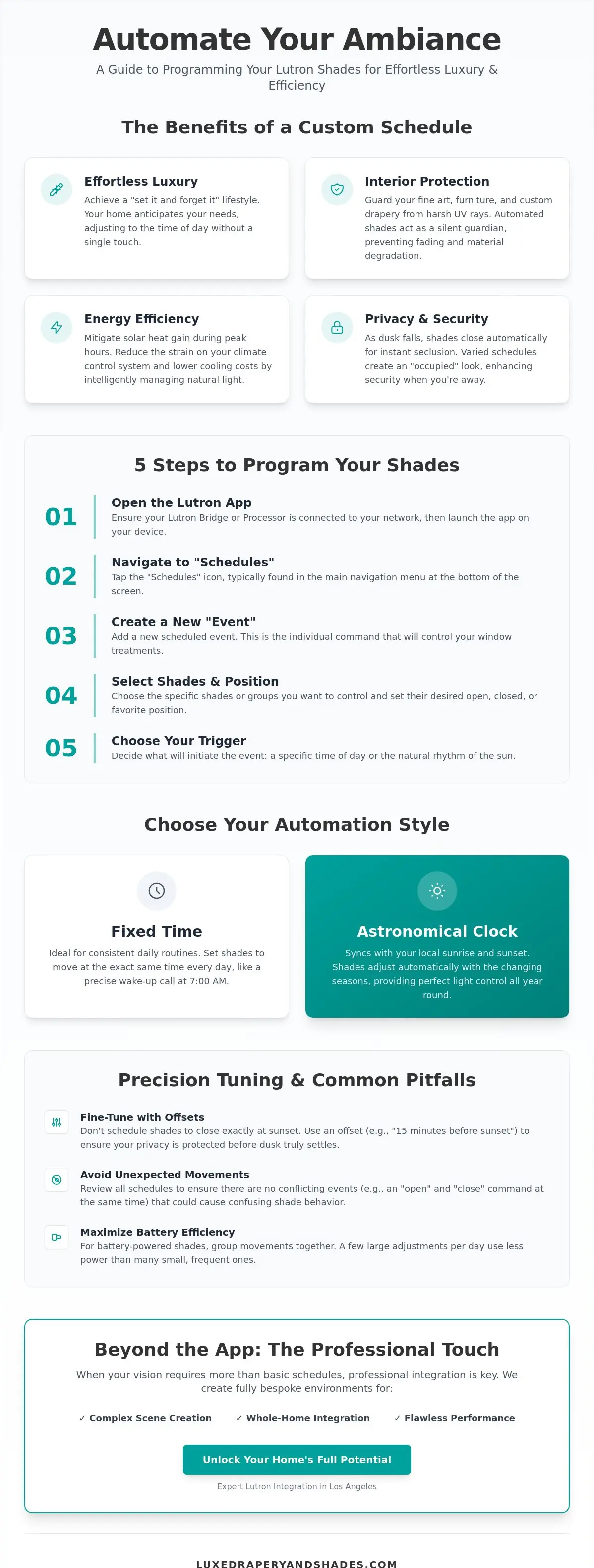
The current version of the app features a clean, intuitive layout designed for effortless navigation. To start, tap the “Schedules” tab located in the primary navigation menu at the bottom of your screen. Here, you’ll find the ability to create “Events,” which are the individual commands that tell your shades when to move. When you create your first event, you’ll select the specific window treatments you wish to control, the desired position, and the frequency of the action. This allows your home to breathe with the day, moving from a bright, energized morning to a tranquil evening without any manual effort.
Programming for Caséta and RadioRA 3 Systems
For those using Caséta or RadioRA 3, the process is remarkably streamlined. After tapping the “Schedules” icon, you can group multiple shades together. This ensures that every shade in a room moves in perfect unison, maintaining the visual order of your architecture. You’ll choose between a “Fixed Time” trigger, which is ideal for consistent daily routines, or an “Astronomical” trigger. The latter is particularly effective for achieving significant energy savings by aligning with the natural movement of the sun. If you find the technical setup daunting, a professional consultation from Luxe Drapery and Shades can ensure your system is perfectly calibrated from the start.
Managing Multiple Schedules and Overrides
A sophisticated system should be flexible enough to accommodate changes in your lifestyle. The app allows you to toggle specific schedules on or off, which is perfect for when you’re hosting guests or observing holidays. You should also understand how manual overrides work within the ecosystem. If you use a Pico remote to adjust a shade, the automated schedule will typically pause its command or simply wait until the next programmed event to resume its duties. To keep your system organized, use evocative naming conventions like “Golden Hour” or “Midnight Seclusion” rather than generic labels. This helps you manage a complex estate with the same ease as a single room.
Advanced Automation: Sunrise, Sunset, and Scene-Based Scheduling
Advanced automation transforms a residence from a static structure into a responsive environment that breathes with the day. While fixed time triggers offer consistency, the true sophistication of programming a Lutron shades schedule lies in the astronomical clock. This feature allows your window treatments to track the sun’s position with mathematical precision based on your specific location. In Los Angeles, where the light quality shifts dramatically from the morning marine layer to the sharp afternoon glare, this synchronization is vital for maintaining an ideal atmosphere. It ensures your home is always in harmony with the natural world outside your windows.
The power of this system is best realized through the use of “Offsets.” Rather than waiting for the sun to disappear completely, you can program your shades to descend 20 minutes before sunset. This proactive adjustment secures your privacy before the transition to interior lighting makes your home visible from the street. This level of detail is a hallmark of luxury, providing a seamless transition between day and night without requiring a single manual intervention. As discussed in this Lutron Serena review, the ability to integrate these triggers across a broader smart home ecosystem ensures that your environment feels truly bespoke and effortlessly managed.
The Magic of Astronomical Triggers
Lutron systems utilize your zip code to calculate exact sunrise and sunset times, adjusting automatically as the seasons change. This is particularly useful for “Daylight Harvesting,” a strategy that maximizes natural light while minimizing solar heat gain. By adjusting offsets for different seasons in Southern California, you can ensure your shades are open during the pleasant winter sun but closed during the intense summer afternoons. This intelligent regulation keeps your interiors comfortable while significantly reducing the load on your climate control system.
Curated Lifestyle Scenes for Luxury Living
Scheduling becomes even more impactful when integrated with “Scenes,” which are holistic settings that adjust multiple elements of your home simultaneously. For families, a “Nursery Scene” can ensure blackout shades follow a strict nap-time schedule, creating a consistent sleep environment. In South Bay homes where afternoon glare can disrupt a home cinema, an “Entertainment Scene” can lower the shades and dim the lights to perfection. For a gentle start to the day, the “Morning Glow” scene can be programmed to slowly raise motorized honeycombs, allowing you to wake up to soft, diffused light that gradually fills the room. This rhythmic approach to home management ensures your living space is always perfectly aligned with your personal routine.
Precision Tuning: Troubleshooting and Common Scheduling Mistakes
Achieving a flawless home environment requires more than just the initial setup; it demands ongoing precision and a keen eye for detail. When programming a Lutron shades schedule, you might occasionally encounter “ghost movements,” where window treatments adjust at unexpected times. This phenomenon often occurs when a legacy schedule remains active in the background or when a secondary smart home platform sends a conflicting command. Reviewing your event log within the app is the first step toward reclaiming total control over your space and ensuring that your home’s movements are entirely intentional.
Battery management is another critical consideration for owners of Triathlon shades. While Lutron’s technology is incredibly efficient, aggressive scheduling that moves shades multiple times an hour will naturally shorten the interval between battery changes. Similarly, conflict resolution becomes necessary if two different schedules attempt to control the same room simultaneously. The system typically prioritizes the most recent command, but overlapping instructions can lead to stuttered movement or a failure to reach the intended position. Ensuring your Lutron processor is running the latest 2026 firmware is essential for accessing improved logic handling and new diagnostic tools that simplify these complex interactions.
Solving Connectivity and Sync Issues
Reliable performance depends on the communication range between your Smart Bridge and your Lutron sivoia shades. Large Los Angeles estates with thick architectural materials like stone or reinforced concrete may require signal repeaters to maintain a stable link across the entire property. If a specific event stops triggering correctly, try deleting and recreating that schedule to clear any cached data that might be causing a sync error. For persistent system-wide communication failures that disrupt your home’s harmony, calling a professional is the most efficient path to restoration.
Avoiding Common Programming Pitfalls
The most frequent errors are often the simplest to correct. A common AM/PM mistake during manual time entry can result in shades opening at midnight rather than noon, disrupting your privacy when you least expect it. While Lutron systems are designed to handle Daylight Savings Time automatically, it’s wise to verify your time zone settings after a major app update or a power cycle. Finally, avoid the temptation of over-scheduling. A home that feels too “busy” with constant shade movement can become a distraction rather than a sanctuary. Luxury is found in the quiet, intentional movement of your environment, not in constant mechanical adjustments. If you’re experiencing technical hurdles that interfere with your comfort, contact Luxe Drapery and Shades for an expert system audit and professional recalibration.
The Professional Touch: Expert Lutron Integration in Los Angeles
While the Lutron app provides an excellent entry point for home management, the complexities of a sprawling Los Angeles estate often require a more nuanced approach. Programming a Lutron shades schedule for a residence with dozens of zones and varied architectural exposures demands a level of precision that transcends standard DIY settings. Professional integration ensures that every motorized treatment, from the primary suite to the gallery, moves with a synchronized grace that defines modern luxury. When your home transitions between lighting scenes, it should do so with a quiet confidence that reflects the quality of the space itself.
Luxe Drapery and Shades specializes in this high-level calibration. Our expertise in programming a Lutron shades schedule allows us to account for the specific orientation of your home, ensuring that solar protection and privacy are never compromised by changing seasons or shifting light. As a certified dealer, we move beyond basic functionality to create a curated environment where technology feels like a natural extension of the architecture. For those utilizing the HomeWorks or RadioRA 3 platforms, professional programming is essential to unlock the full potential of the hardware. We focus on the concept of “Quiet Luxury,” where the system operates with such silent reliability that it becomes a seamless part of your daily experience.
Architectural Shading Solutions for LA Estates
Hard-to-reach clerestory windows and expansive skylights present unique challenges that our team is expertly equipped to handle. We ensure these treatments are integrated into your broader ecosystem, whether you utilize Crestron, Savant, or Josh.ai for whole-home control. A hallmark of professional installation is the perfect alignment of hembar movements. When multiple shades in a grand room descend to the exact same millimeter, it creates a visual order and clean aesthetic that off-the-shelf solutions simply cannot replicate. This mathematical precision preserves the design intent of your home while providing effortless function.
Your Partner in Smart Luxury
Our relationship with our clients doesn’t end when the installation is complete. We provide ongoing support and system optimization to ensure your home continues to evolve with your lifestyle and needs. There is a fundamental difference between a mere product install and the creation of a truly curated environment. We believe that every window treatment is an essential element of a beautiful living space, deserving of expert attention and long-term care. We invite you to experience the difference that professional expertise brings to your living environment. Schedule a consultation with Luxe Drapery and Shades to elevate your home’s automation to its highest standard.
Crafting Your Sanctuary with Light and Motion
Mastering your environment is the ultimate home luxury. You’ve seen how programming a Lutron shades schedule goes far beyond simple timers; it’s about aligning your living space with the natural rhythm of the day. Whether you’re harnessing astronomical clocks to track the Los Angeles sun or troubleshooting connectivity for a flawless transition, the goal is always the same: effortless comfort and the preservation of your home’s aesthetic beauty. When technology functions with this level of intuition, it ceases to be a tool and becomes a vital layer of your interior design.
As a Certified Lutron Dealer and Licensed California Contractor #1066068, our team understands the specific needs of Westside and South Bay luxury estates. We’re here to help you move from basic app settings to a fully calibrated, professional system that anticipates your every move. Design your dream automated home with Luxe Drapery and Shades today. We look forward to helping you transform your home into a perfectly synchronized sanctuary where every detail reflects your individual style.
Frequently Asked Questions
Can I program my Lutron shades to open at different times on weekends?
Yes, the Lutron app provides the flexibility to create day-specific events. When setting up a new schedule, you simply toggle the specific days you wish the command to be active. This allows you to enjoy a leisurely morning on the weekends while ensuring your Westside home is perfectly prepared for your professional routine during the work week.
Do I need a special bridge to schedule my Lutron Serena shades?
Yes, a Lutron Smart Bridge or Processor is essential for any scheduling functionality. This device serves as the communication hub between your shades and your home network. Without this bridge, your window treatments function only through direct remote control, lacking the intelligent automation required for a truly responsive and curated living environment.
What happens to my Lutron shades schedule if the power goes out?
Your schedules are securely stored within the bridge or processor, which automatically re-syncs its internal clock once power returns. While your shades will remain stationary during the outage, the system resumes its programmed rhythm immediately upon restoration. There is no need for manual intervention or re-programming after a brief Los Angeles power fluctuation.
How do I set my shades to follow the sunrise and sunset in Los Angeles?
You can enable this by selecting the “Astronomical” trigger when programming a Lutron shades schedule in the app. The system utilizes your local zip code to track the exact sunrise and sunset times for your property. This ensures your home breathes with the natural light of Southern California, adjusting its atmosphere as the seasons shift.
Can I control and schedule my Lutron shades while I am away from home?
Yes, the Lutron app offers secure remote access from any location with an active internet connection. You can monitor the current position of your window treatments or adjust your automated events while you are away from your estate. This feature provides peace of mind, allowing you to manage your home’s privacy and energy efficiency from across the globe.
Is it possible to schedule my Lutron shades using voice commands through Alexa or Siri?
Yes, Lutron systems are designed to integrate with Apple HomeKit, Amazon Alexa, and Google Assistant for effortless voice control. While the primary schedule is defined within the Lutron app, you can use voice commands to trigger specific scenes at any moment. This allows you to instantly override your schedule for a spontaneous movie afternoon or an early evening rest.
How many different schedules can I create in the Lutron app?
The Lutron ecosystem supports up to 50 unique events, providing ample room for programming a Lutron shades schedule that covers every room in your estate. This allows you to create distinct light transitions for various spaces, from the kitchen to the primary suite. You can design a sophisticated environment that anticipates your needs without encountering technical constraints on your creativity.
Will my manual adjustments on a Pico remote cancel my automated schedule?
No, manual adjustments through a Pico remote or the app act as temporary overrides rather than permanent cancellations. Your shades will remain in the manually selected position until the next scheduled event is triggered by the processor. This logic allows you to respond to immediate needs without compromising the long-term automation of your home’s light control.